
The day-to-day management of fixed assets is a critical business function—one not easily understood outside the accounting and finance departments. The top-down nature of the decision to implement an Enterprise Resource Planning (ERP) system often does not specifically consider the unique requirements of fixed asset managers. Yet incomplete or inaccurate fixed asset management and reporting can negatively impact the bottom line with overpaid taxes and insurance, and potentially cause corporate compliance failures.
Two Approaches to Fixed Assets and ERPs
Essentially, there are two approaches to managing fixed assets in an ERP information environment. The first is to implement an add-on module from your ERP vendor. However, the main focus for many add-ons is the integration, not the features and functions required to plan for the most strategic use of assets and make positive impacts on the financial well-being of the company.
The second approach involves using a dedicated fixed asset management solution that is more fully-featured and feeds important fixed asset depreciation data to your ERP system. Through data integration, both ERP add-on modules and dedicated fixed asset solutions can transfer fixed asset data among the fixed asset system, the General Ledger (GL), and other business functions, such as Accounts Payable (AP) and Purchasing.
Fixed asset management is a tiny part of what ERP research and development teams typically work on. However, it is the exclusive focus of dedicated fixed asset systems such as Sage Fixed Assets. The Sage Fixed Assets development, compliance, quality assurance, and customer support teams all receive extensive training in the intricacies of depreciation. The team includes depreciation experts and CPAs who ensure that the solution stays on top of ever-changing tax laws and addresses the key concerns of fixed asset managers in the most timely, efficient, and reliable way.
Timely Updates to Address Changing Tax Laws
Customers trust Sage Fixed Assets for total accuracy in their depreciation calculations. The availability of regular updates when tax laws change is a key difference between Sage Fixed Assets and add-on modules from ERP vendors. At Sage, a team of depreciation experts monitors all tax law changes and immediately goes to work incorporating them into the next release of Sage Fixed Assets.
An annual tax update incorporating all of the pertinent tax law changes for the next tax filing is released at the end of each year. Additionally, other releases of the software provide product enhancements and further tax law changes if new rules are announced midyear. These updates are included with a Sage Fixed Assets subscription or Business Care plan.
ERP vendors do not always schedule software releases based on tax law changes. That is because most software updates will impact multiple software modules and business units.
When Congress changes a tax law, your ERP vendor is unlikely to respond immediately, if ever. This leaves fixed asset managers in the unenviable position of having to manually determine how the changing tax laws impact their business. Without a timely release, you may have to pay consultants to update your fixed asset module to reflect current tax law or compliance regulations.
Questions to Ask When Considering Options
When selecting a fixed asset management solution, it’s important to find one that addresses the key duties of fixed asset managers throughout the lifecycle of fixed assets. Consider your company’s needs:
- What advanced fixed asset accounting features will you require?
- Are all of the tax forms that you will need to produce automated?
- Do you need to track and manage invoices and budget during work-in-progress projects before a new fixed asset is created?
- Will you take routine physical inventories of fixed assets?
- What types of reports and projections will management expect? Or the auditor?
- How many people will need to access the fixed asset system? Are they located in different buildings, cities or countries?
Complete Fixed Asset Lifecycle Management
Because of its exclusive focus on fixed assets, Sage Fixed Assets has the most complete feature sets available today. Perhaps the most defining feature of Sage Fixed Assets is its comprehensive management of the entire fixed asset lifecycle, from construction-in-progress projects and acquisition, to transfer and disposal.
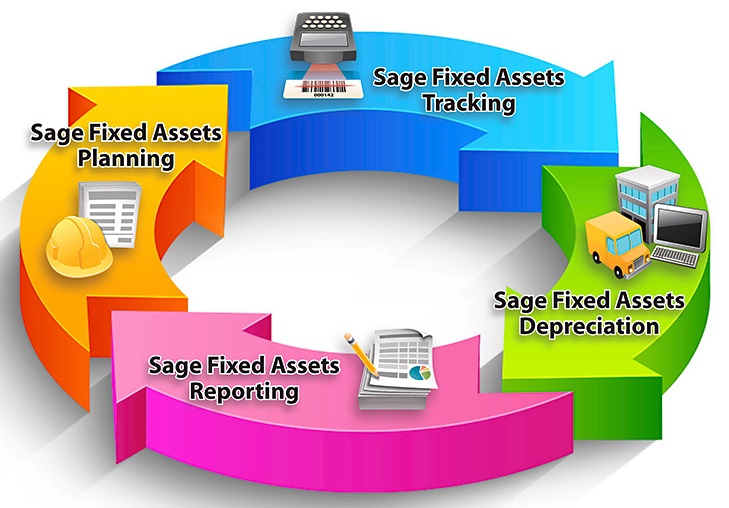
Sage Fixed Assets is easy to implement, learn, and use. Every feature is designed to help fixed asset managers and their teams accomplish routine tasks in fewer steps and with more accuracy.
It is easier than ever to take advantage of all the benefits offered by Sage Fixed Assets while still fully utilizing your ERP system. For businesses facing the decision between implementing a dedicated fixed asset management system, such as Sage Fixed Assets or adding an ERP module, read our blog Fixed Asset System vs ERP Fixed Asset Module At a Glance.
Want more information about whether a dedicated fixed asset solution is right for you? Contact us today to talk to one of our fixed asset experts.